
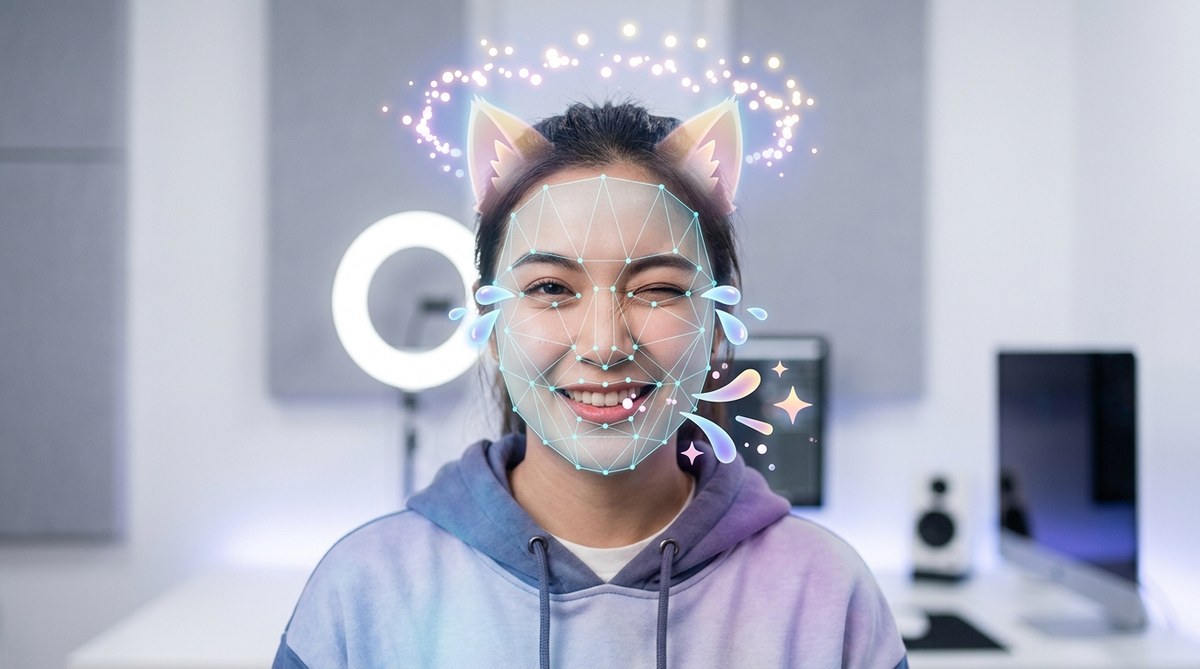
Face tracking and expression effects in Effect House are transforming how creators build engaging and dynamic AR filters. These tools unlock new levels of interaction, allowing users to see their facial movements reflected in fun, artistic ways. Whether you are new to AR development or looking to sharpen your skills, understanding how to leverage face tracking and expression effects is essential to making your filters stand out on TikTok and beyond. This guide walks you through the core concepts, practical steps, and expert tips to harness Effect House’s capabilities confidently.
Mastering face tracking and expression effects in Effect House allows creators to craft immersive, interactive AR filters. By understanding key components, following best practices, and experimenting with tools, anyone can develop captivating effects that resonate with audiences and boost engagement on TikTok.
Creating compelling face tracking and expression effects in Effect House opens a world of creative possibilities. These effects respond to users’ facial movements, enabling effects like smiling, raising eyebrows, or blinking to trigger animations or transformations. This interactivity makes filters more engaging and shareable, which is crucial for social media success. As Effect House continues to evolve as TikTok’s primary AR development platform, learning to use these features effectively can give you a competitive edge whether you are a developer, content creator, or tech enthusiast.
Understanding Face Tracking and Expression Effects in Effect House
Face tracking is the backbone of many AR effects. It involves detecting and following facial features in real time. Expression effects, a subset of face tracking, focus on recognizing specific facial expressions or movements like smiling, frowning, or eye blinking. These effects are then used to trigger animations, change appearances, or add interactive elements.
Effect House offers comprehensive tools to implement these effects. Its face tracking system utilizes advanced algorithms to identify key landmarks on the face. These landmarks help you anchor virtual objects or effects precisely. Expression detection builds on this by recognizing specific gestures or muscle movements, opening creative avenues for interactive filters.
How Face Tracking Works in Effect House
Effect House’s face tracking uses a combination of computer vision and machine learning to analyze the user’s camera feed. It locates facial features such as eyes, eyebrows, nose, mouth, and jawline. These points are used to create a facial mesh—a digital overlay that mimics the user’s facial movements.
Key components include:
- Facial landmarks: Precise points that mark key features on the face.
- Facial mesh: A 3D model that deforms based on facial movements.
- Tracking nodes: Elements that follow the landmarks and mesh during the live camera feed.
This setup allows developers to attach virtual objects to specific facial features or animate effects based on movement.
Creating Expression-Based Effects Step-by-Step
Building expression effects involves several steps that are accessible even for beginners. Here’s a straightforward process to get started:
- Set up your project: Begin by creating a new effect in Effect House.
- Add a face tracker node: This component detects the face and provides data on facial landmarks.
- Identify target expressions: Choose expressions you want to detect, such as smiling or eyebrow raising.
- Create expression triggers: Use the expression detection nodes to set conditions, like a smile being more than a certain threshold.
- Link to animations or effects: Connect these triggers to animate objects, change filters, or activate visual effects.
- Test the effect: Use the preview feature to see how your face tracking reacts in real time.
- Refine and publish: Adjust sensitivity levels and effects to improve user experience before sharing your filter.
Practical example: Making a smile-activated sparkle effect
Suppose you want to create a filter that adds sparkles whenever the user smiles. The process involves detecting a smile expression and then triggering an animation of sparkles around the face. Setting up this effect can be done within minutes once you grasp the core tools.
Best Practices for Face Tracking and Expression Effects
To maximize the impact and reliability of your effects, keep in mind these tips:
- Use clear, high-quality camera feeds: Good lighting enhances face detection accuracy.
- Test on different devices: Face tracking performance varies across hardware.
- Adjust sensitivity thresholds: Fine-tune expression detection nodes to avoid false triggers.
- Keep effects lightweight: Complex effects can slow down performance and cause lag.
- Leverage built-in templates: Effect House offers templates that can accelerate your development process.
- Experiment with multiple expressions: Combining triggers creates more interactive effects.
“Consistency is key. Always test your face tracking effects across different users and lighting conditions to ensure a smooth experience.”
Common Techniques and Pitfalls to Avoid
Here is a quick comparison of techniques and typical mistakes when working with face tracking and expression effects:
| Technique | Mistake to Avoid |
|---|---|
| Using too many high-poly 3D objects | Slowing down effect performance and causing lag |
| Overlapping expression triggers | Causing conflicting animations or false triggers |
| Ignoring device limitations | Building effects that only work on high-end hardware |
| Neglecting user comfort | Creating effects that distract or cause discomfort |
Achieving a balance between visual sophistication and performance is crucial. For example, excessive use of detailed 3D models can hinder real-time responsiveness, especially on lower-end smartphones.
Tips from AR Effect Creators
“Start simple. Use basic facial landmarks to create reliable effects first. Once you master face tracking, you can add complexity.” — AR developer
Innovating with Face Tracking and Expression Effects
Once you are comfortable with basic techniques, consider experimenting with advanced features. Combining face tracking with other sensors like hand or body tracking can lead to immersive multi-layered effects. Additionally, scripting using JavaScript within Effect House enables dynamic, complex interactions that respond to multiple facial cues.
Moving Beyond Basics
As you grow more skilled, explore custom algorithms for specific expressions or movements. For example, detecting subtle micro-expressions can unlock nuanced effects like blinking or lip movements. These can be used for virtual auditions, gaming effects, or personalized filters.
| Technique | Mistake to Avoid |
|---|---|
| Relying solely on default nodes | Missing opportunities for customization |
| Not testing on diverse faces | Effects may not work universally |
| Overcomplicating triggers | Creating confusing user experiences |
| Ignoring updates from Effect House | Missing new features or improvements |
By staying up-to-date with the latest tools and continuously testing your effects, you ensure they remain engaging and functional.
Elevate Your Face Effects with Creative Ideas
Think beyond simple filters. Use face tracking to create interactive games, virtual makeup try-ons, or immersive storytelling effects. For example, a filter that reacts to eyebrow raises can serve as an input method for mini-games or quizzes.
Final Thoughts on Building Face Tracking and Expression Effects
Creating captivating face effects in Effect House is accessible with the right approach. Focus on understanding the core components, follow best practices, and be patient with your experimentation. The more you practice, the more intuitive it becomes to craft effects that delight users and push creative boundaries.
Whether you’re designing a playful filter or a professional-grade AR experience, mastering face tracking and expression detection is your foundation for success. Keep testing, refining, and sharing your creations to make the most of what Effect House offers.
Unlocking endless possibilities with facial effects
Remember, the key to great AR filters lies in continuous learning and experimentation. Use these techniques as a starting point, but don’t hesitate to push your creative limits. With time and practice, you’ll develop effects that are not only fun to make but also loved by your audience.
Happy creating!