
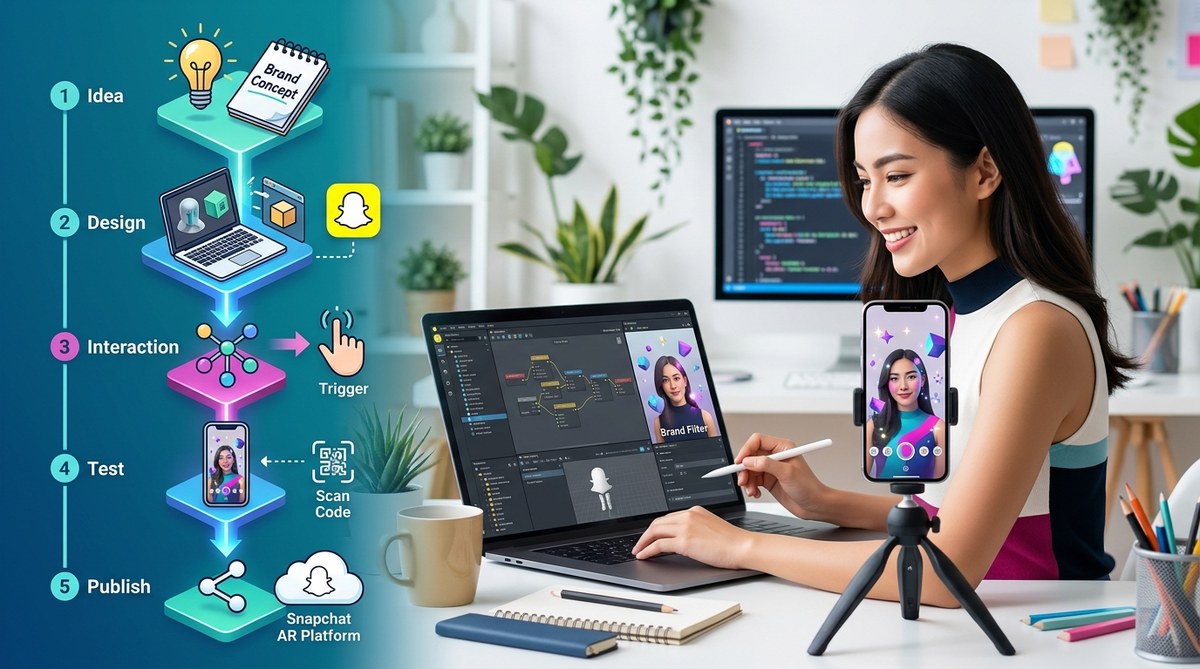
Creating your own Snapchat filters can be a game-changer for brand engagement. Whether you want to promote a new product, celebrate an event, or simply add some fun to your marketing, designing filters that resonate with your audience is key. But how do you start? This guide walks you through how to create Snapchat filters in a straightforward way, helping you turn your ideas into viral effects without needing advanced skills.
Understanding what makes a Snapchat filter effective
Before diving into the creation process, it’s helpful to understand what makes a filter appealing. Successful filters are often simple, visually striking, and aligned with your brand message. They should enhance the user experience without overwhelming it. Remember that Snapchat has specific design guidelines, so familiarizing yourself with their specs ensures your filter gets approved fast.
“A great filter captures attention quickly and invites users to share it with friends. Focus on clarity, simplicity, and relevance.” — AR design expert
Creating Snapchat filters involves understanding your audience, designing visually appealing effects, following platform guidelines, and testing thoroughly. It’s accessible for beginners with some practice and the right tools. Clear goals and simplicity lead to more shareable, successful filters that boost your brand presence.
Step-by-step process for creating Snapchat filters
Follow these essential steps to craft and launch a filter that captures attention and encourages sharing.
1. Define your goal and concept
Start by clarifying what you want your filter to achieve. Are you promoting a product, celebrating an event, or just engaging your community? Pinpoint your target audience and the message you want to convey. For example, a new store opening might inspire a location-based filter with your logo and a cheerful greeting.
2. Design your filter visuals
Create your filter using graphic design software or online tools. Keep these points in mind:
– Use high-quality images with transparent backgrounds
– Stick to the maximum dimensions Snapchat recommends—1080 x 2340 pixels
– Follow the platform’s color and font guidelines
– Keep the design simple and recognizable at small sizes
A good rule is to focus on one central element, like your logo or a fun graphic. Avoid clutter that can make the filter confusing or hard to share.
3. Use tools and templates to simplify design
If designing from scratch feels daunting, consider using pre-made templates or AR platforms that provide drag-and-drop features. For example, Lens Studio offers ready-to-use templates that can be customized with your branding. These tools save time and help ensure your design meets Snapchat’s specs.
4. Set your filter parameters
Decide when and where your filter will be available. Snapchat allows you to:
– Pick specific dates for your filter to run
– Define geographic boundaries using a geofence
– Target specific events or locations
This precision helps you reach the right audience at the right time, making your campaign more effective.
5. Submit your filter for approval
Upload your design to Snapchat’s filter submission portal. Ensure it adheres to their rules—no offensive content, proper dimensions, and no misleading elements. Snapchat reviews filters typically within a day or two, so plan accordingly.
“Pay attention to Snapchat’s guidelines. Submitting a well-prepared, compliant filter increases the chances of quick approval and smoother campaign launch.” — Snapchat support team
Best practices for creating impactful Snapchat filters
- Simplicity works best: Users prefer filters that are easy to understand and use.
- Make it shareable: Design effects that encourage users to take photos or videos with your filter.
- Align with your brand: Use colors, fonts, and images consistent with your branding.
- Test before launch: Use Snapchat’s preview features to see how your filter appears on different devices.
- Monitor performance: After launch, check usage data to see how your filter performs and optimize future designs.
Techniques to enhance your filters
| Technique | What it does | Common mistakes |
|---|---|---|
| Bright colors | Makes your filter pop | Using too many at once can look cluttered |
| Clear focal point | Ensures your message is understood | Overloading with text or images |
| Consistent branding | Reinforces your identity | Deviating from your style guide |
| Interactive elements | Engages users more | Overcomplicating with too many effects |
Mistakes to avoid when creating Snapchat filters
- Ignoring Snapchat’s guidelines on size and content
- Overdesigning, leading to clutter and confusion
- Failing to test on multiple devices
- Not setting clear goals for your campaign
- Forgetting to track filter usage after launch
Expert advice on designing filters that go viral
“Focus on what your audience loves. Use humor, trending themes, or interactive features that invite sharing. Keep testing and refining based on user feedback.” — AR marketing strategist
Additional tips for success
- Consider partnering with influencers to promote your filter
- Use relevant hashtags and call-to-actions in your campaign
- Create a sense of urgency with limited-time filters
- Leverage user-generated content to amplify reach
Final thoughts on crafting your perfect Snapchat filter
Designing a filter that resonates begins with understanding your audience and keeping your visuals straightforward yet engaging. With the right tools, clear goals, and adherence to platform rules, anyone can create compelling effects that increase brand awareness. Remember, the key is to make filters fun, relevant, and easy to share. So gather your ideas, follow these steps, and start experimenting today. Your next viral filter could be just a few clicks away.
Keep experimenting and watch your brand grow
Creating Snapchat filters is accessible for marketers willing to learn and adapt. Don’t hesitate to test different designs and strategies. The more you practice, the better your filters will become at capturing attention and encouraging sharing. Dive into the platform, utilize available tools, and keep your creativity flowing. Your audience will thank you for the fun, engaging experiences you craft.